vuejs
- el-table通过tree-props实现表格嵌套表格
1、html代码如下: <el-table> :data="tableData" style="width: 100%;margin-bott
- 调用v-touch后运行报 'priority' of undefined错误解决方法
1、报这个错误是因为版本的问题,priority只存在于vue-touch 1.*Vue 1 需要安装vue-touch npm install vue-touch@next –save 卸掉原来的 npm uninstall vue-t

- [推荐] 豆包网页版:支持AI聊天,AI图片生成,AI漫画生成,AI写作等
字节跳动开发的一款多功能人工智能工具,基于云雀模型(豆包大模型)构建。它不仅是一个AI聊天机器人,还具备多种功能,包括写作助手、英语学习助手、音乐生成、编程助理等。
- 如何获取window.print()打印回调事件
//定义打印前事件 var beforePrint = function() { console.log("beforePrint"); }; //定义打印后事件 var afterPrint = function()
- el-button按钮实现v-for遍历
html代码 <template slot-scope="scope"> <el-button v-for="(item, index) in tableBtn" :k
- 修复vue2.0中v-if使用数组内的条件修改后无法执行
在el-table表格可以使用v-show实现动态条件判断,可以参考:“e-table循环列表点击当前列表按钮后隐藏当前按钮”,但是v-for循环的列表却不行,下面我们来看一下this.$set()。 调用方法:th
- e-table循环列表点击当前列表按钮后隐藏当前按钮
1、根据id或index判断,按钮只显示大于0的按钮 @click="openListData(scope.$index, scope.row)" v-show="scope.row.id > 0&quo
- JavaScript实用工具函数开发技巧
阻止冒泡事件 export const stopPropagation = (e) => { e = e || window.event; if(e.stopPropagation) { // W3C阻止冒泡方法 e.stopProp
- vuejs实现全站可配置
1、找到/build/webpack.dev.conf.js新增配置,运行项目用到 “`js new HtmlWebpackPlugin({ filename: 'index.html', template: 'i
- 常用18个正则表达式
1、中文字符 var pattern = /[\u4e00-\u9fa5]/; var str = "建站教程"; console.log(pattern.test(str)); 2、双字节字符 var pattern
- 数组flat()的用法
flat()方法会按照一个可指定的深度递归遍历数组,并将所有元素与遍历到的子数组中的元素合并为一个新数组返回。flat除了有扁平化嵌套数组之外还可以扁平化空项。 实例: let a = [1,2,3,[4,5,[6,7]]] console
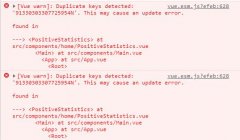
- v-for循环出现控制Duplicate keys detected: 'XXXXXX'报错是什么原因
v-for循环出现控制Duplicate keys detected: 'XXXXXX'. This may cause an update error.报错,但不影响操作是什么原因? 1、原因是v-for循环不是用索引做k
- JavaScript开发小技巧之各种时间操作
当前时间 export const nowTime = () => { const now = new Date(); const year = now.getFullYear(); const month = now.getMont
- JavaScript开发小技巧之各种浏览器操作
滚动到页面顶部 export const scrollToTop = () => { const height = document.documentElement.scrollTop || document.body.scrollT
- JavaScript开发小技巧之各种格式校验
校验身份证号码 export const checkCardNo = (value) => { let reg = /(^\d{15}$)|(^\d{18}$)|(^\d{17}(\d|X|x)$)/; return reg.test
- JavaScript开发小技巧之cookie
设置cookie export const setCookie = (key, value, expire) => { const d = new Date(); d.setDate(d.getDate() + expire); do